Build repository workflows
Create a BullMQ TypeScript, BullMQ Rust, or Celery Python project for interval and webhook work.
A repository workflow is a normal GitHub-backed SproutOS project whose runtime handles queued work. Use it for arbitrary code, third-party packages, long business logic, or an existing BullMQ or Celery application.
Create the scaffold
Open Workflows → New workflow. Choose whether the project is standalone or belongs to an existing repository group, then select:
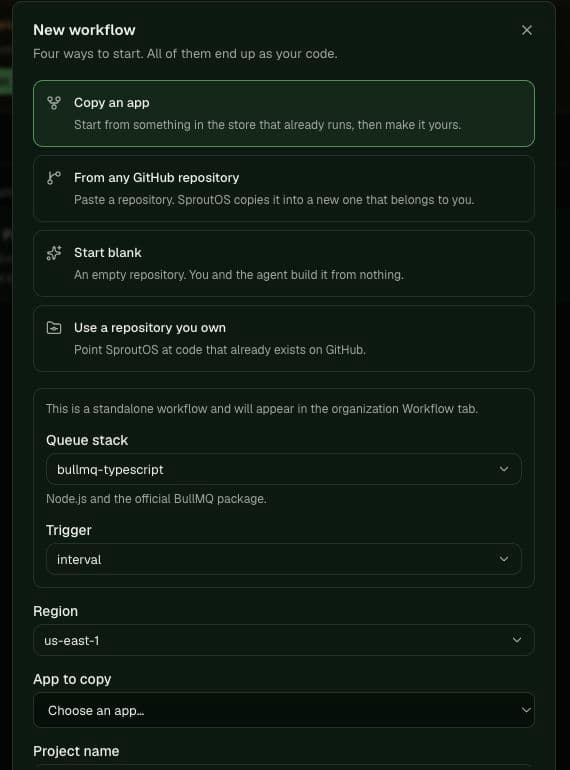
- BullMQ · TypeScript for Node.js and the official
bullmqpackage; - BullMQ · Rust for Rust and the BullMQ-compatible crate;
- Celery · Python for Celery with Valkey as broker and result backend.
Choose an interval schedule or webhook trigger. After the project is created, SproutOS opens its Agent page with a prompt to build the chosen worker, attach Valkey, use injected connection values, add structured failure logs, and provide a small status endpoint proving a real job completed.
Attach Valkey
Attach a Valkey service to the workflow project. Read VALKEY_URL or REDIS_URL and, for BullMQ, BULLMQ_PREFIX from the environment. Never construct a platform host, tenant key prefix, or credential in source.
The workflow project does not receive a website domain. A health or status handler is diagnostic; the workload still starts from its interval, webhook, or queue event.
Make work finite
SproutOS invokes the application when work is available. Process the supplied batch and return. Release database clients and do not leave a blocking queue read, subscription, timer, or infinite worker loop alive. Compute remains billable until the invocation returns.
Split work that cannot finish within one invocation, enqueue the continuation, and return. See Background workers and Limits.
Deploy and prove the worker
Build the repository for its runtime, deploy the finished artifact, enqueue a harmless test job, and verify all of the following:
- the trigger reached the expected project;
- a real job completed and produced the expected state change;
- failures appear in structured logs with enough context to retry safely;
- the handler returned and no idle invocation remained;
- queue and compute usage appeared in billing and observability.
Production database migrations are still a separate CI dependency. An Agent sandbox test or successful workflow deployment does not migrate the production database.