Work with Agent sandboxes
Understand isolated workspaces, preview ports, disposable database branches, pushed changes, and cleanup.
Each hosted Agent session works in an isolated sandbox with the project repository checked out. The sandbox is for editing and testing code; it is not the production deployment and it does not inherit production runtime secrets.
What the Agent can do
The Agent can edit files, install packages, run tests, start a development server, and use public HTTP or HTTPS through the SproutOS egress proxy. It receives short-lived, scoped platform actions for operations such as choosing a group's primary project or requesting a database branch. It does not receive raw model-provider credentials or infrastructure credentials.
Conversation history and streamed tool results stay with the project, so reopening the session does not require reconstructing what changed from a final message alone.
Preview a development server
Start the application on 0.0.0.0, not 127.0.0.1, and use a supported port such as 3000, 5173, or 8080. Open Preview, select the port, and use the embedded preview or signed external link.
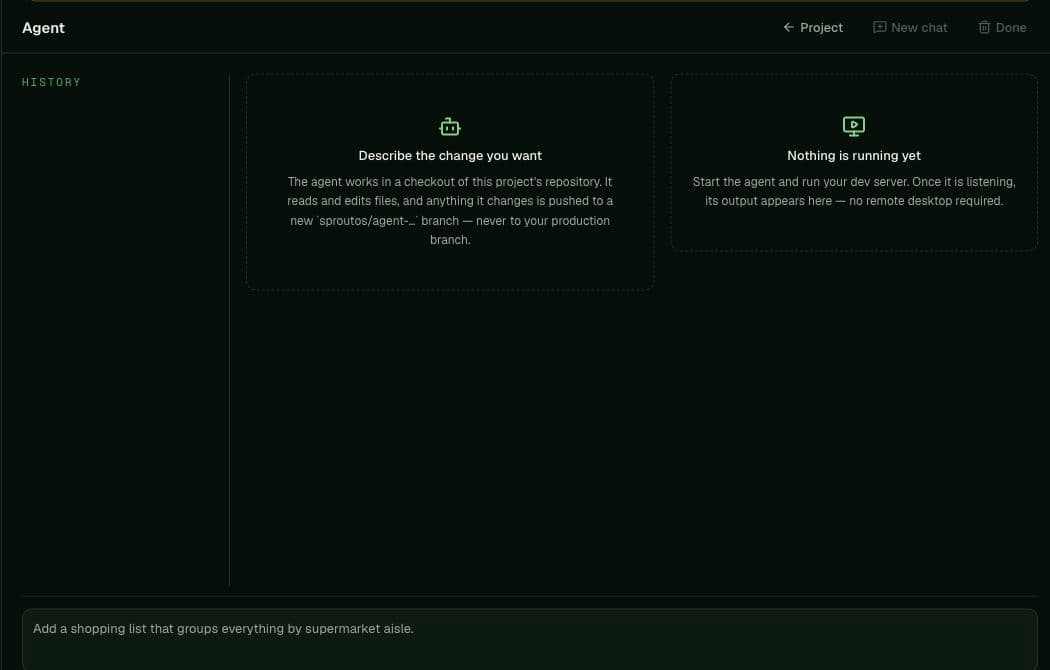
A preview proves the process in the sandbox is reachable. It does not prove a production build, deployment, domain, environment, or migration. After checking the UI, still build and deploy the intended artifact and verify its production hostname.
Request a disposable database branch
Sandboxes begin without DATABASE_URL. When database-backed code must run, the Agent can request a named Postgres branch copied from the project's primary branch. The returned connection reaches only that temporary copy and is carried through the sandbox network proxy.
Use it to run migrations and tests without changing production data. A branch lasts at most 24 hours and each sandbox may own up to four active branches. Delete it after the test; ending the sandbox removes any remaining branches.
Understand what persists
The Agent stages, commits, and pushes repository changes to a sproutos/agent-* branch, never the production branch. Those GitHub commits remain after the sandbox is destroyed and can be reviewed or merged through the repository's normal controls.
Processes, temporary files outside the repository, previews, and disposable database branches do not outlive sandbox cleanup. Selecting Done destroys the sandbox and its temporary database branches; it does not delete the pushed GitHub branch.
Sandboxes stop after inactivity, so persist useful work in the repository and do not treat a detached preview as a hosted service.